Speech-to-Text Transformer from Scratch
Building a Transformer-based speech-to-text model from scratch in PyTorch. Audio fundamentals, convolutional downsampling, self-attention, residual vector quantization, and CTC loss.
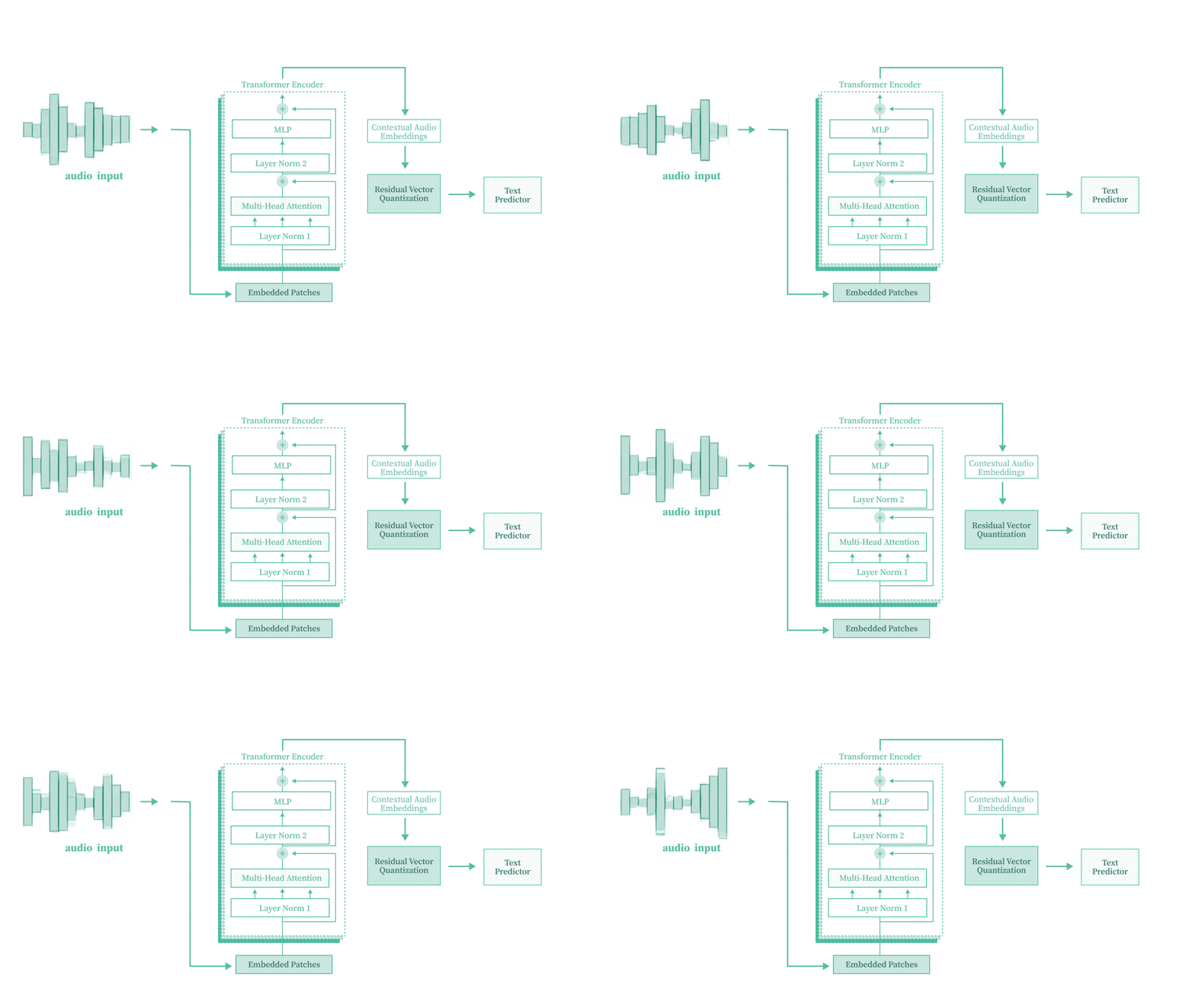
Table of Content
- 1.1 Introduction
- 1.2 Understanding Audio Fundamentals
- 1.3 Approaches to Speech-to-Text
- 1.4 The Dataset
- 1.5 Character Tokenizer
- 1.6 The Attention Scaling Problem
- 1.7 Full Architecture Overview
- 1.8 Convolutional Downsampling Network
- 1.9 Transformer Encoder
- 1.10 Vector Quantization and RVQ
- 1.11 Assembling the Full Model
- 1.12 CTC Loss
- 1.13 The Overall Loss Function
- 1.14 Data Loading and Collation
- 1.15 The Training Loop
- 1.16 Training and Results
- 1.17 Configuration and Getting Started
- 1.18 Key Takeaways
1.1 Introduction
Speech-to-Text (STT) converts spoken audio into written text. It's behind voice assistants like Siri and Alexa, YouTube subtitles, and real-time meeting transcription.

Figure 1.1 Use cases of Speech-to-Text, including voice assistants, subtitle generation, and meeting transcription.
In this post, we build a Transformer-based Speech-to-Text model from scratch in PyTorch. Raw audio waveforms go in, text transcriptions come out. No pre-trained models, no APIs. We train it on an A100 GPU and walk through every piece of the architecture.
The full source code is available on GitHub.
We'll cover how audio is represented digitally, how to downsample long audio sequences with convolutions, how Transformer self-attention processes audio features, how Vector Quantization and Residual Vector Quantization work, and how CTC loss lets us train without frame-level alignment labels.
1.2 Understanding Audio Fundamentals
Before writing any model code, let's understand what audio actually looks like to a computer.
Open a voice recorder app on your phone. When you speak, you see waveforms moving in real time. Those are audio waveforms.
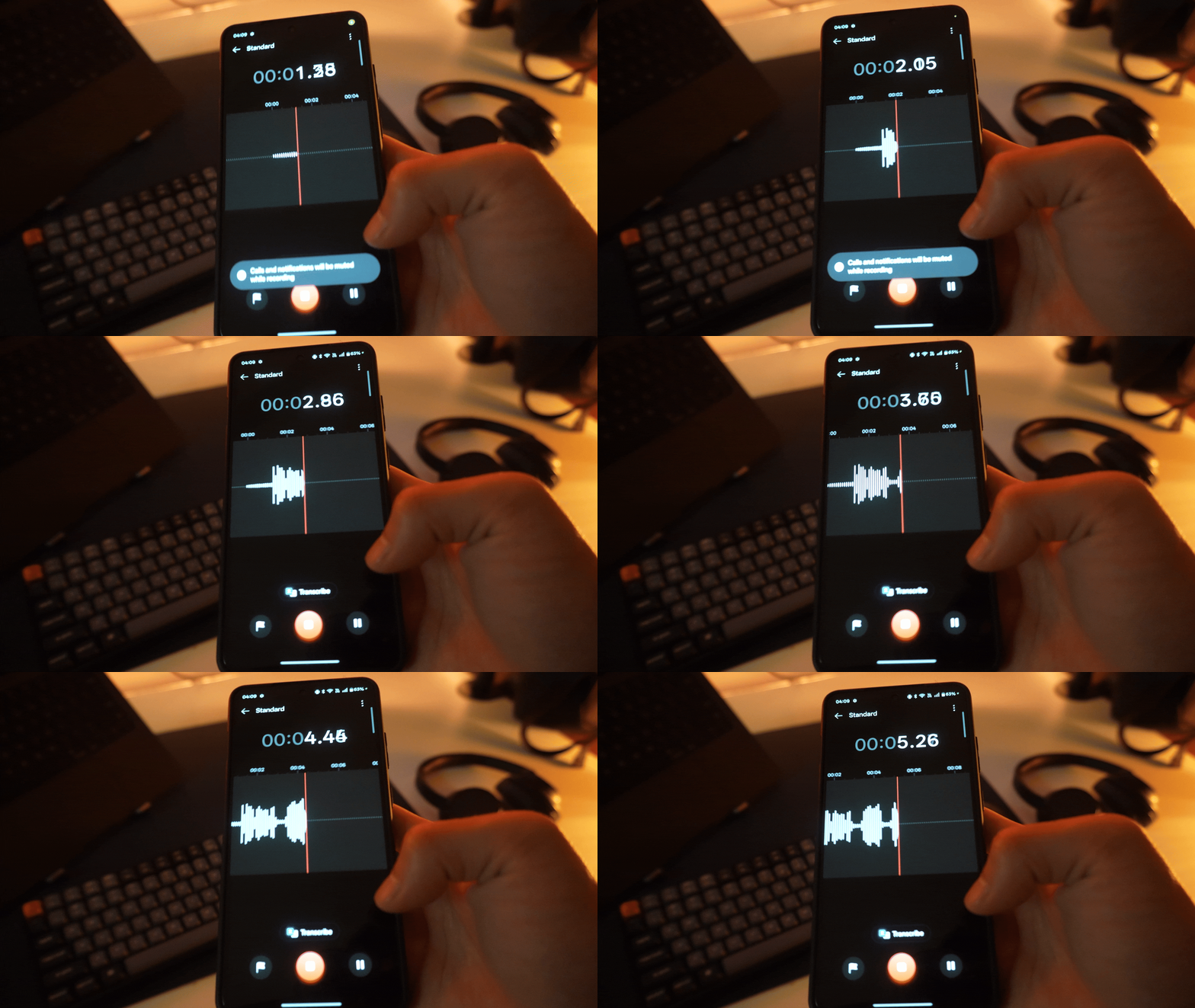
Figure 1.2 A phone voice recorder displaying real-time audio waveforms as the user speaks.
An audio waveform is a discrete representation of sound in digital devices. The x-axis represents time, and the y-axis represents amplitude, which captures air pressure changes picked up by the microphone.
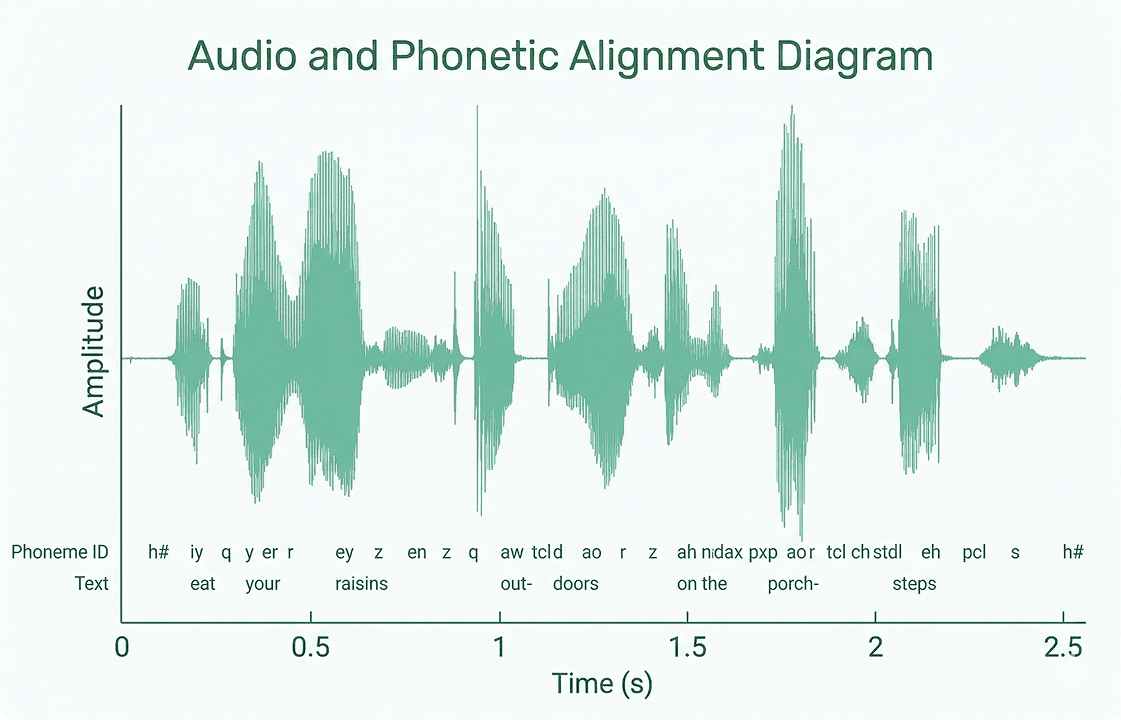
Figure 1.3 Audio waveform representation with time on the x-axis and amplitude on the y-axis.
When you zoom into a waveform, each tiny point is called a sample. The number of samples captured per second is the sampling rate, measured in Hertz (Hz). A sampling rate of 16,000 Hz means 16,000 amplitude values are recorded every second.
So audio is stored as a 1D array of floating-point numbers, and this array is saved inside a .wav file. For a 7-second audio clip at 16,000 Hz:
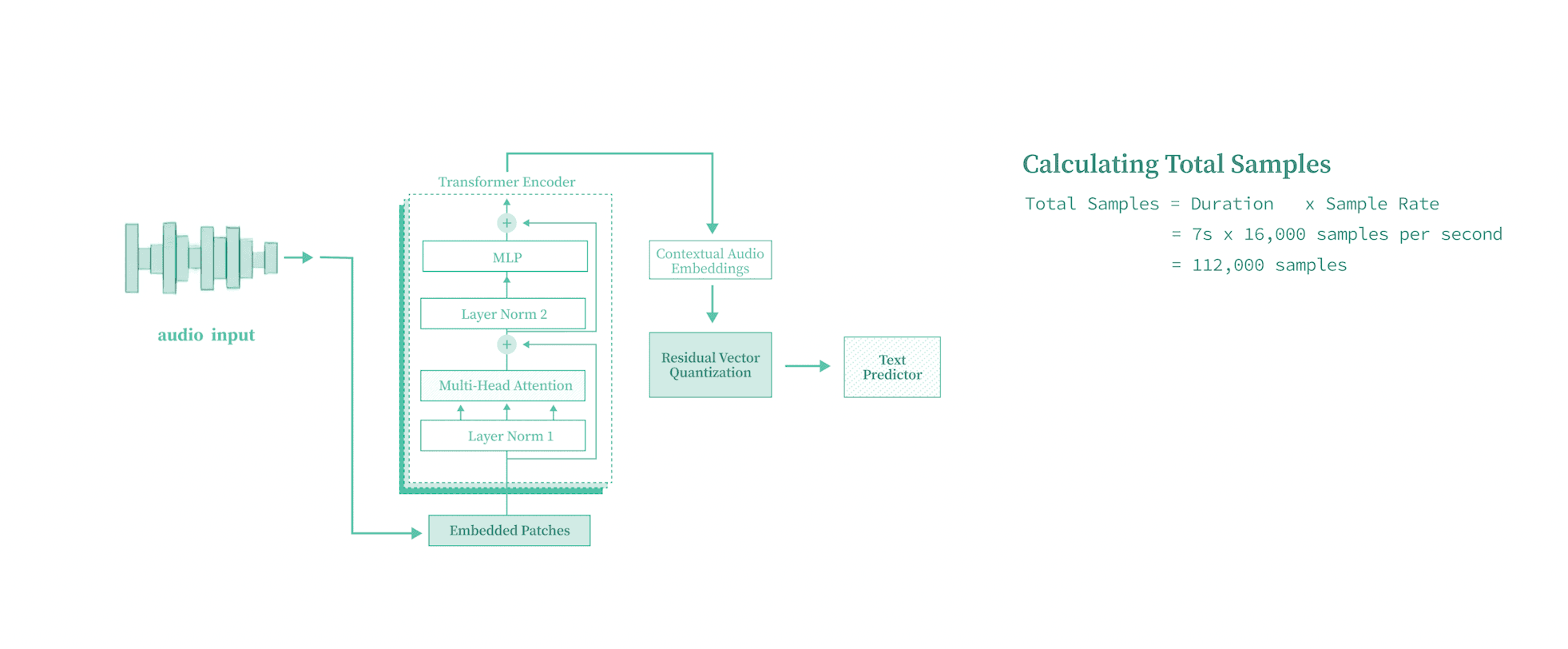
Figure 1.4 Calculating the total number of samples from audio duration and sampling rate.
That is 112,000 numbers representing just 7 seconds of speech. Keep this number in mind. It will become very important when we discuss attention.
1.3 Approaches to Speech-to-Text
There are many architectures and approaches for STT.
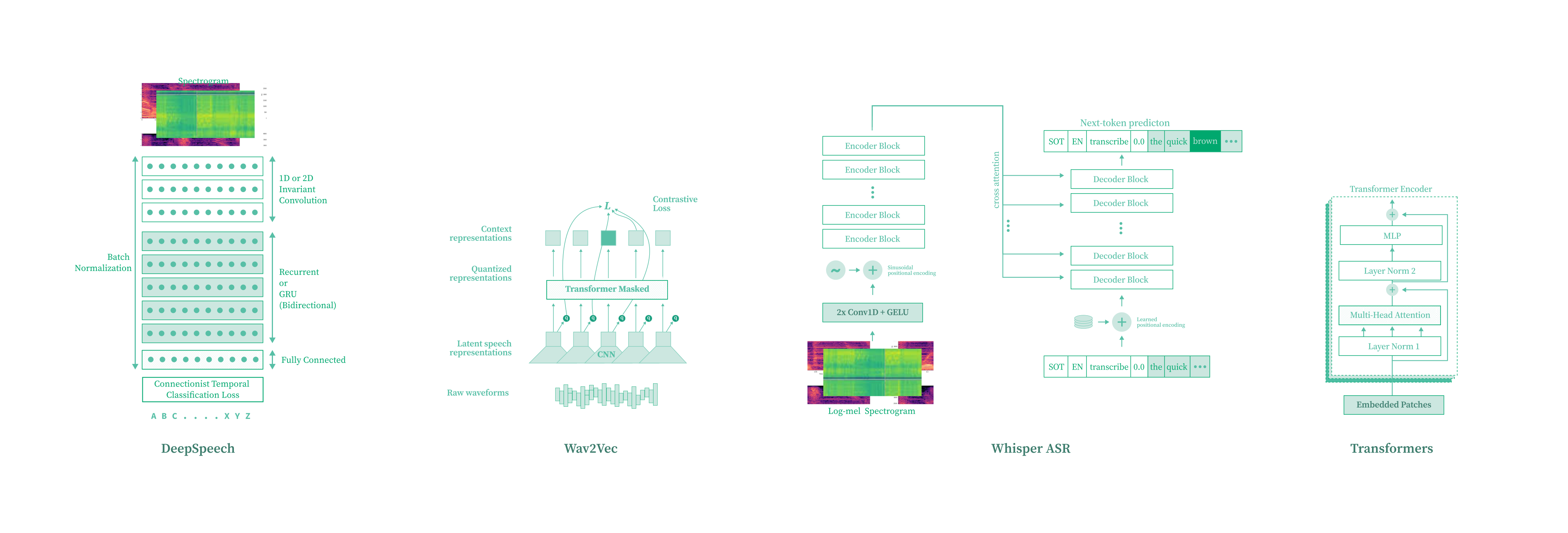
Figure 1.5 Different approaches to Speech-to-Text.
Waveform vs. Frequency domain: Earlier methods used Mel-Frequency Cepstral Coefficients (MFCCs), which transform audio into the frequency domain. MFCCs are compact but lose information. Modern methods learn directly from the raw waveform, and that's what we'll do.
Encoder-Decoder vs. Encoder-only: Encoder-decoder architectures (like Whisper) generate text autoregressively with a decoder. We'll use a simpler encoder-only approach: audio goes through a Transformer encoder, and the output directly predicts characters at each time step.
Pre-trained vs. From Scratch: Models like wav2vec 2.0 use self-supervised pre-training. We're training everything from scratch to understand how the pieces fit together.
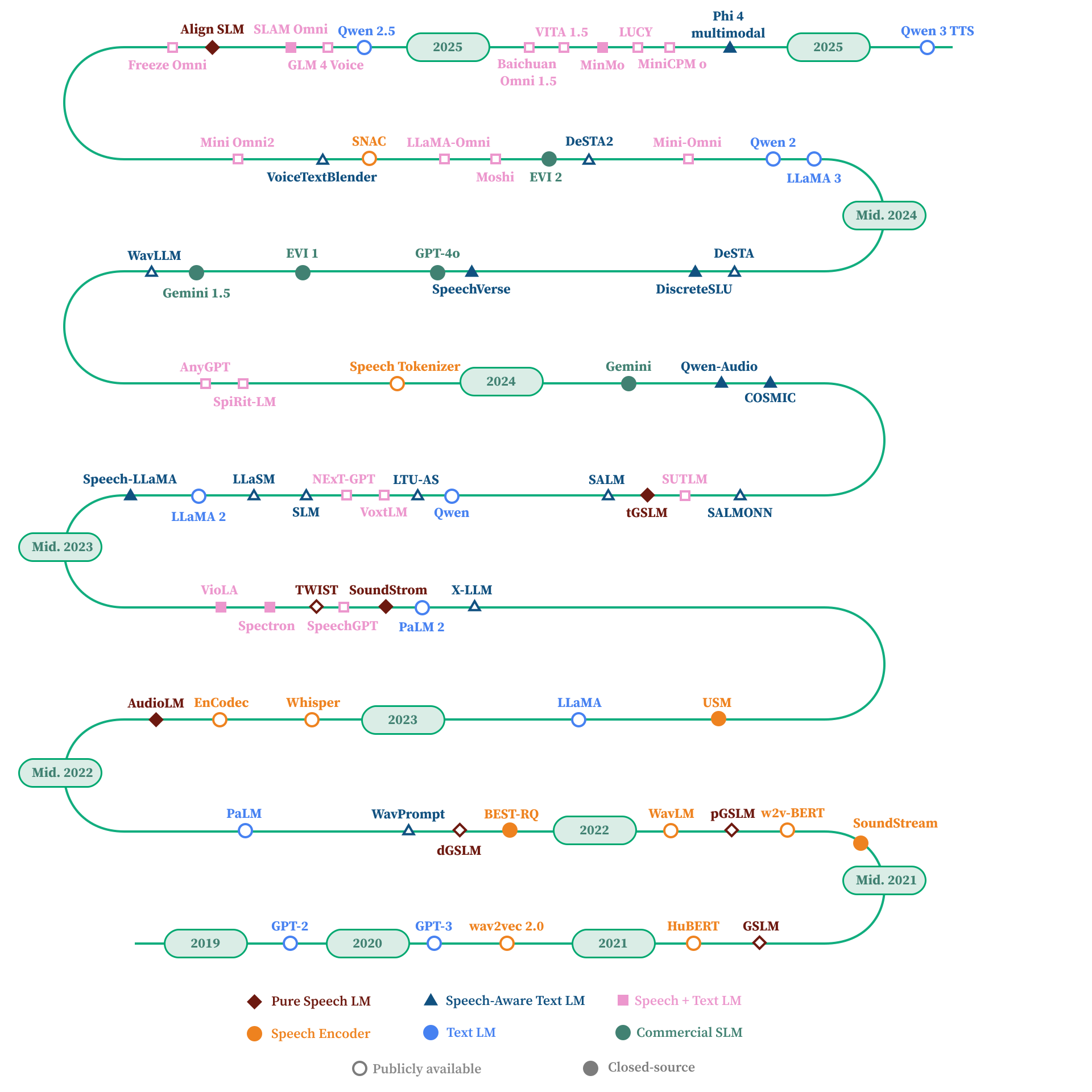
Figure 1.6 Timeline of audio deep learning architectures.
DeepSpeech 2 and wav2vec also use CTC-based training, which we'll implement later. Future posts will cover those architectures from scratch too.
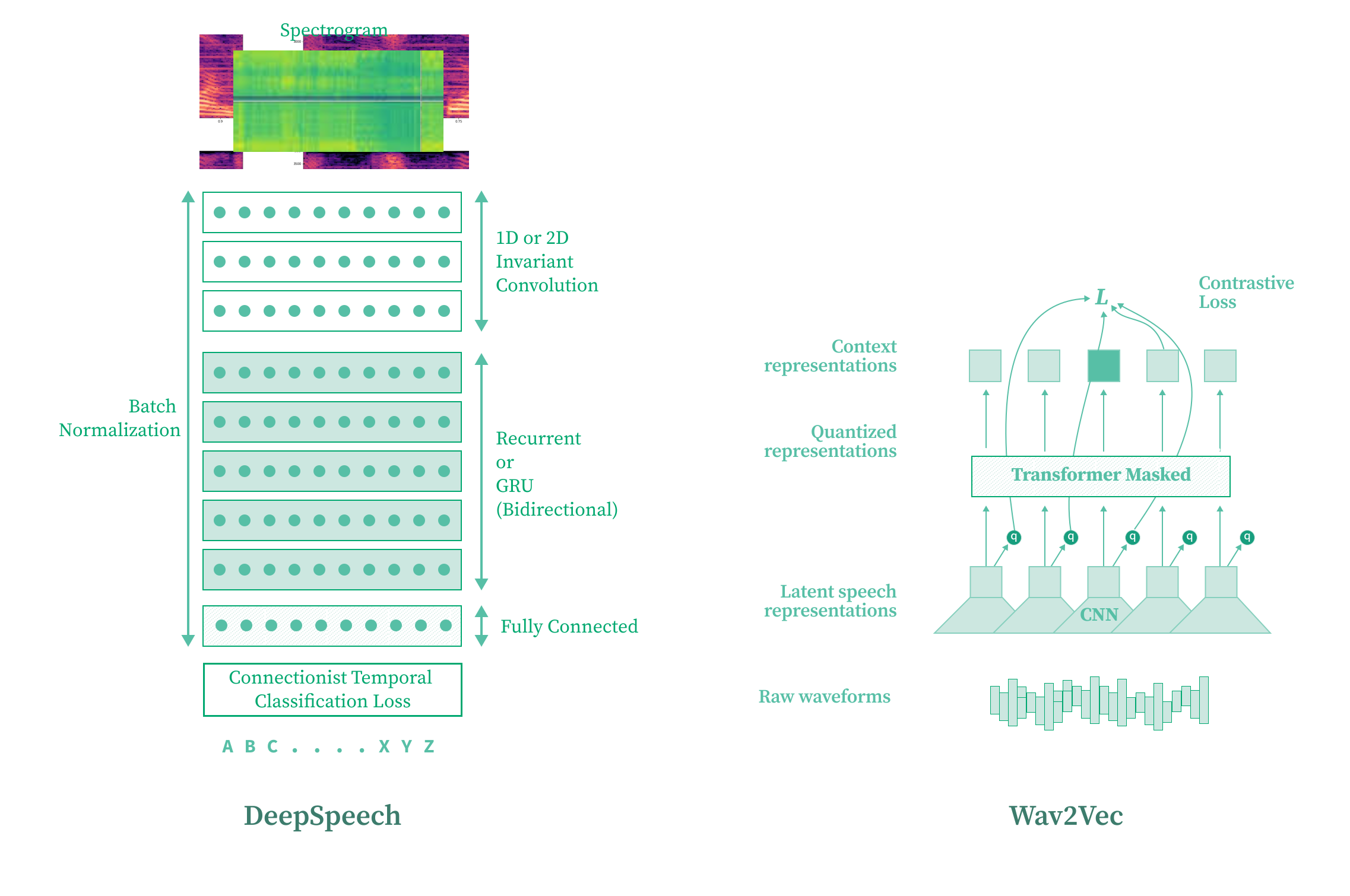
Figure 1.7 Comparison of DeepSpeech and wav2vec architectures.
1.4 The Dataset
We train on the LJ Speech dataset: 13,100 audio clips of a single English speaker, averaging about 7 seconds each, paired with text transcripts.
Here is an example from the dataset. The audio waveform (an array of numbers) paired with its transcript:
"The examination and testimony of the experts enabled the Commission to conclude that five shots may have been fired."
You can load this dataset via Hugging Face Datasets. In our implementation, we used a subset hosted on Hugging Face for faster iteration:
HF_DATASET_NAME = "m-aliabbas/idrak_timit_subsample1"
SAMPLE_RATE = 16000
BATCH_SIZE = 32
1.5 Character Tokenizer
Neural networks don't understand text directly, so we need to convert characters into numerical token IDs. There are several tokenization strategies (BPE, WordPiece, character-level). We use a character tokenizer because it has no out-of-vocabulary problems, gives us a tiny vocabulary of just 28 tokens, and pairs naturally with CTC loss since CTC predicts one character per time step.
Our vocabulary consists of 26 alphabets (A through Z), a blank token used by CTC for alignment, and a space token for word boundaries.
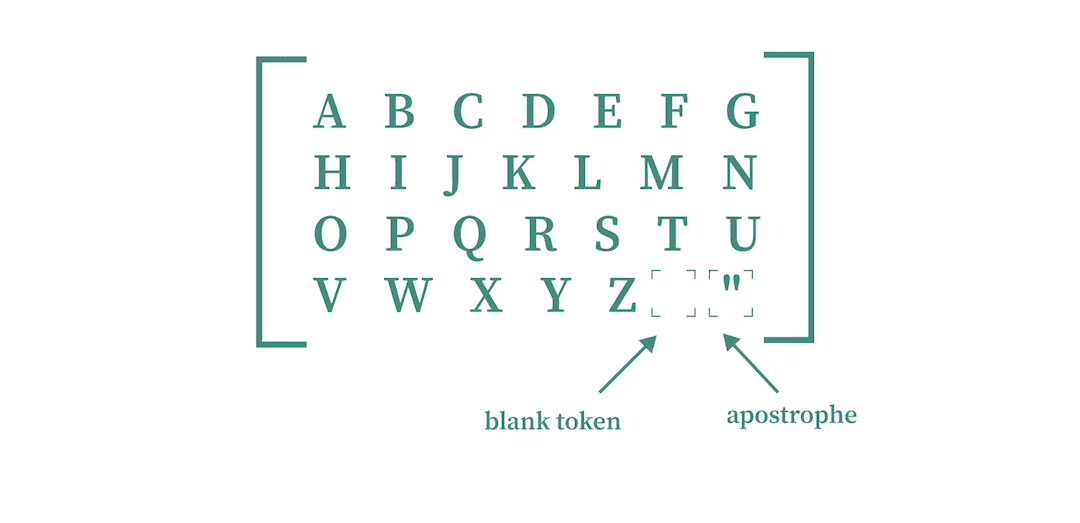
Figure 1.8 Character tokenizer vocabulary consisting of 26 letters, a blank token, and a space token.
Here is the tokenizer implementation:
from tokenizers import Tokenizer, models, pre_tokenizers, decoders

def get_tokenizer(save_path="tokenizer.json"):
    tokenizer = Tokenizer(models.BPE())

    # Blank/pad token for CTC
    tokenizer.add_special_tokens(["▁"])

    # Character-level tokens: A-Z and space
    tokenizer.add_tokens(list("ABCDEFGHIJKLMNOPQRSTUVWXYZ "))

    # Byte-level pre-tokenizer and decoder
    tokenizer.pre_tokenizer = pre_tokenizers.ByteLevel(add_prefix_space=True)
    tokenizer.decoder = decoders.ByteLevel()

    tokenizer.blank_token = "▁"
    tokenizer.blank_token_id = tokenizer.token_to_id("▁")

    tokenizer.save(save_path)
    return tokenizer
If you look at tokenizer.vocab, the IDs range from 0 to 27. Each letter has an associated integer value:
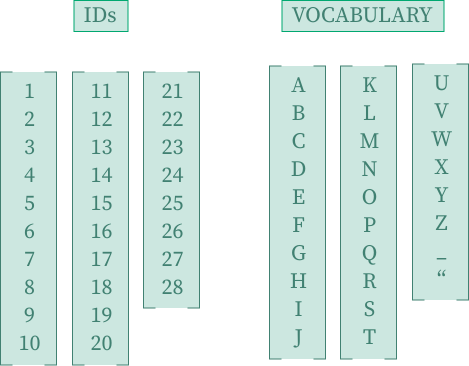
Figure 1.9 Token IDs and vocabulary mapping, showing the integer value assigned to each character.
For example, encoding the sentence "DON'T ASK ME TO CARRY AN OILY RAG LIKE THAT": D maps to 4, O maps to 15, and space maps to 27.
1.6 The Attention Scaling Problem
Here's the problem. Our architecture uses a Transformer, and self-attention scales quadratically with sequence length.
A short sentence like "Hey this side Mayank" has 4 tokens. The attention mechanism creates a 4x4 grid. 16 values. No problem.
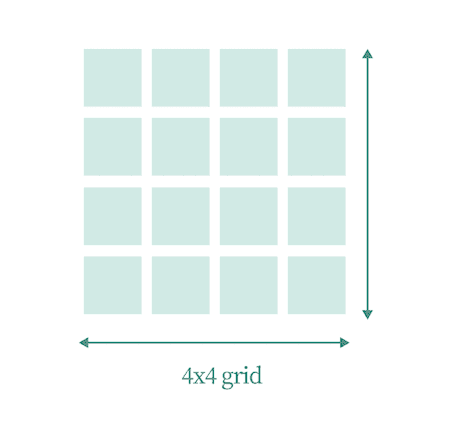
Figure 1.10 A 4x4 attention grid for a short sentence with 4 tokens, requiring only 16 values.
A paragraph with 105 tokens? The attention grid becomes 105x105, about 11,025 values. Still manageable.
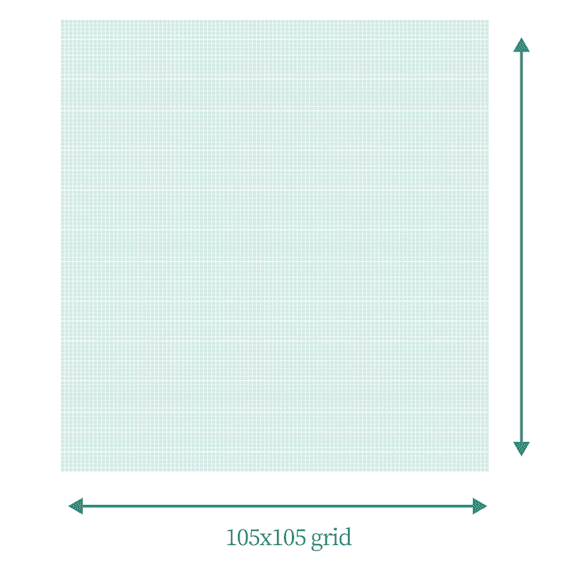
Figure 1.11 A 105x105 attention grid for a paragraph, requiring approximately 11,025 values.
But our 7-second audio clip has 112,000 samples. An attention grid of 112,000 x 112,000 is 12.5 billion values. That's not going to work.

Figure 1.12 112,000 x 112,000 = 12.5 billion values. Global self-attention on raw audio is not happening.
The fix: downsample the audio with a Convolutional Neural Network before passing it to the Transformer. We shrink the sequence from ~112,000 to 2,000-3,000 time steps, which attention can handle.
1.7 Full Architecture Overview
Here's the full architecture:
Figure 1.13 The full Transformer-based Speech-to-Text model.
Four stages: the Convolutional Downsampling Network shrinks the audio sequence and extracts local features. The Transformer Encoder uses self-attention to let each position attend to the full sequence. The Residual Vector Quantizer (RVQ) snaps continuous representations to discrete codebook entries. And a Linear Output Layer projects to vocabulary size with log-softmax for CTC.
Audio (B, T) at 16kHz
  -> Unsqueeze to (B, 1, T)
  -> Convolutional Downsampling -> (B, T', D)
  -> Transformer Encoder        -> (B, T', D)
  -> Residual Vector Quantizer  -> (B, T', D)
  -> Linear + log_softmax       -> (B, T', vocab_size)
Let's build each one.
1.8 Convolutional Downsampling Network
The convolutional front-end does two things: downsample the audio to a manageable length, and extract local features from the raw waveform.
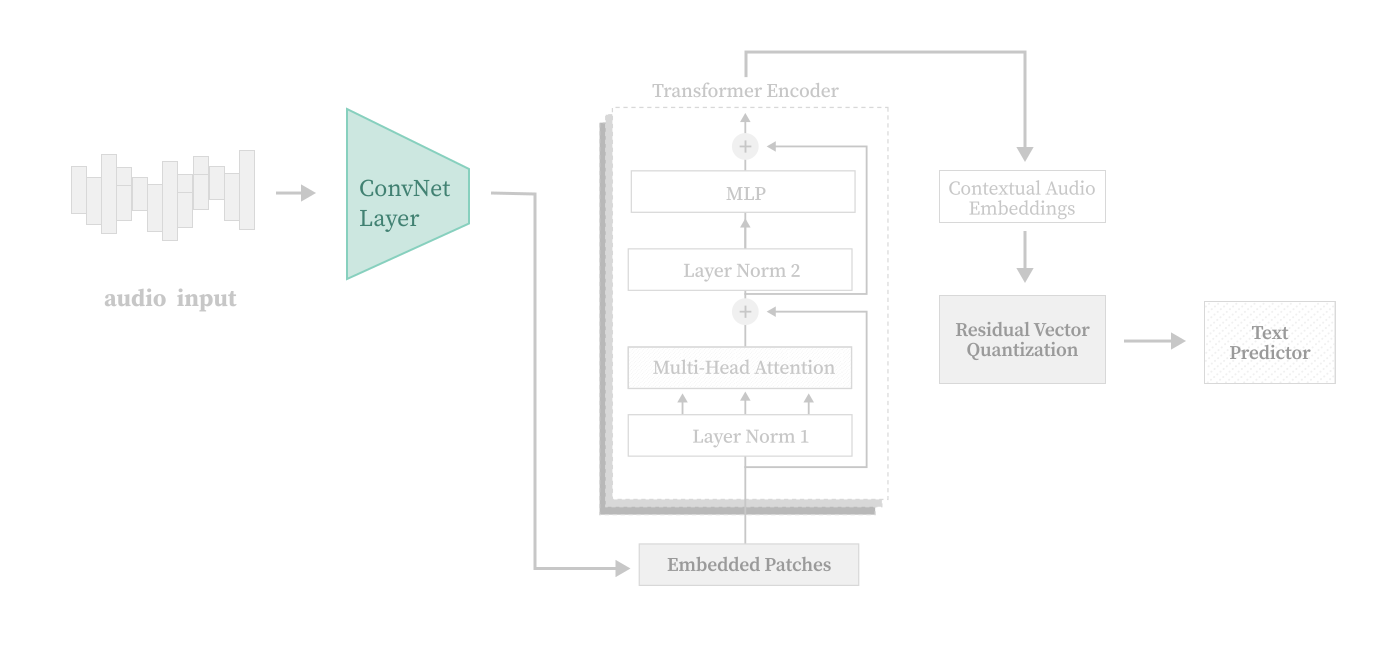
Figure 1.14 The convolutional downsampling network highlighted within the full architecture.
Strided Convolutions for Downsampling
A 1D convolution with a stride greater than 1 skips positions as it slides across the input. Stride 2 means the output is roughly half the length. Stack a few of these and you get aggressive downsampling.

Figure 1.15 Visualization of how strided convolutions downsample a 1D signal by skipping positions.
The Residual Downsampling Block
Each block has two Conv1d layers. The first preserves the temporal length (feature extraction), the second applies a stride to downsample. A residual (skip) connection adds the input directly to the output, helping gradient flow. Batch normalization stabilizes training by normalizing intermediate activations.
import torch
import torch.nn as nn

class ResidualDownSampleBlock(nn.Module):
    def __init__(self, in_channels, out_channels, stride, kernel_size=4):
        super().__init__()

        padding_val = (kernel_size - 1) // 2

        # First conv: preserves temporal length
        self.conv1 = nn.Conv1d(
            in_channels, out_channels,
            kernel_size=kernel_size,
            padding=padding_val,
        )
        self.bn1 = nn.BatchNorm1d(out_channels)

        # Second conv: downsamples via stride
        self.conv2 = nn.Conv1d(
            out_channels, out_channels,
            kernel_size=kernel_size,
            stride=stride,
            padding=(kernel_size - 1) // 2,
        )

        self.relu = nn.ReLU()

        # Projection for residual connection when dimensions change
        if in_channels != out_channels or stride != 1:
            self.residual_proj = nn.Conv1d(
                in_channels, out_channels,
                kernel_size=1, stride=stride, padding=0,
            )
        else:
            self.residual_proj = nn.Identity()

    def forward(self, x):
        residual = self.residual_proj(x)

        out = self.conv1(x)
        out = self.bn1(out)
        out = self.relu(out)
        out = self.conv2(out)

        # Handle slight dimension mismatches from padding
        if out.shape[-1] != residual.shape[-1]:
            min_len = min(out.shape[-1], residual.shape[-1])
            out = out[..., :min_len]
            residual = residual[..., :min_len]

        out = out + residual
        return self.relu(out)
The Full Downsampling Network
The full network chains an initial mean pooling layer (2x downsampling) with four residual blocks (each stride 2), then a final projection convolution to the target embedding dimension.
class DownsamplingNetwork(nn.Module):
    def __init__(self, embedding_dim=32, hidden_dim=16, in_channels=1,
                 initial_mean_pooling_kernel_size=2, strides=(2, 2, 2, 2)):
        super().__init__()

        self.mean_pooling = nn.AvgPool1d(
            kernel_size=initial_mean_pooling_kernel_size,
            stride=initial_mean_pooling_kernel_size,
        )

        self.layers = nn.ModuleList()
        current_in = in_channels
        for i, s in enumerate(strides):
            block_in = current_in if i == 0 else hidden_dim
            self.layers.append(
                ResidualDownSampleBlock(block_in, hidden_dim, stride=s, kernel_size=8)
            )

        self.final_conv = nn.Conv1d(hidden_dim, embedding_dim, kernel_size=4, padding="same")

    def forward(self, x):
        # x: (batch, 1, time)
        x = self.mean_pooling(x)

        for layer in self.layers:
            x = layer(x)

        x = self.final_conv(x)     # (B, embedding_dim, T')
        x = x.transpose(1, 2)       # (B, T', embedding_dim)
        return x
Total downsampling factor: roughly 32x (2x from pooling, then 2x from each of four residual blocks: 2 x 2 x 2 x 2 x 2 = 32). Our 112,000 samples become ~3,500 time steps, well within what self-attention can handle.
1.9 Transformer Encoder
After downsampling, we have a sequence of feature vectors. But these features are local. Each one only "sees" a small window of the original audio. The Transformer encoder uses self-attention so each position can attend to the full sequence.
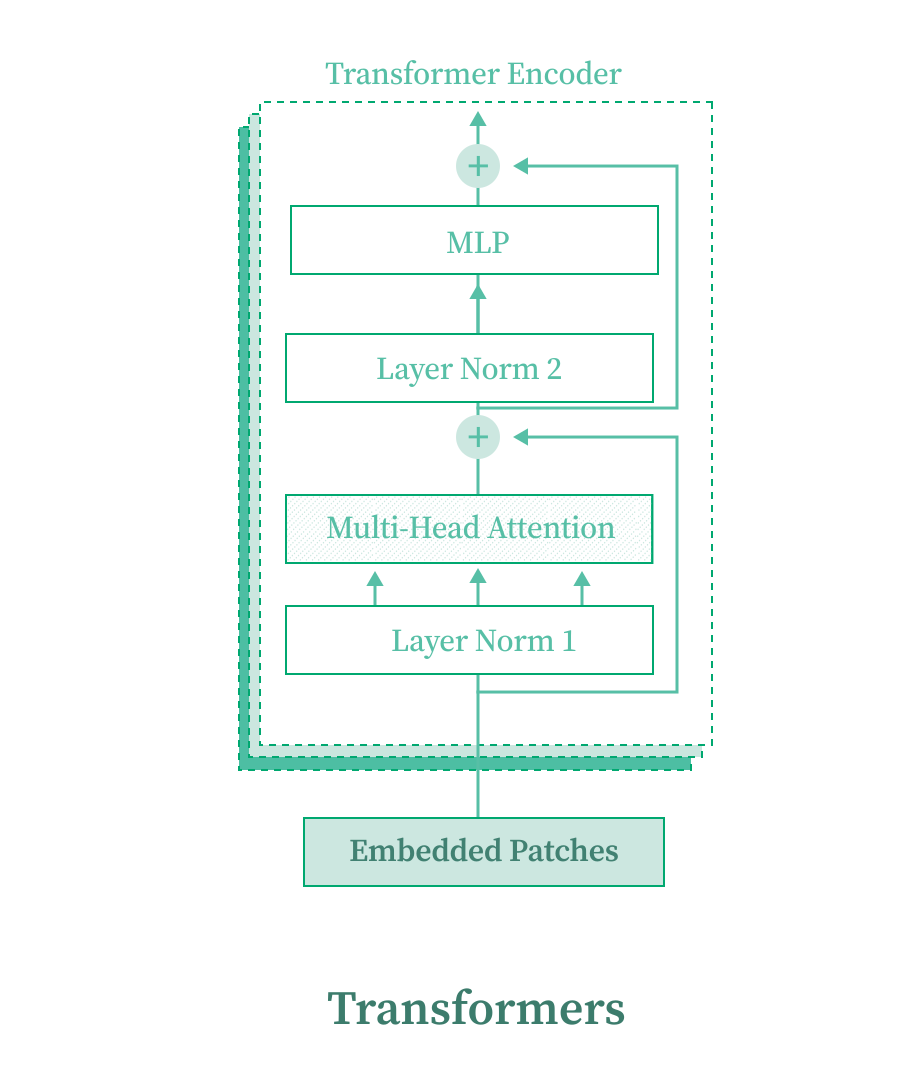
Figure 1.16 The Transformer encoder within the full architecture.
If you're new to Transformers and self-attention, read the Attention Is All You Need paper first.
Sinusoidal Positional Encoding
Transformers have no built-in notion of order. We add sinusoidal positional encodings so the model knows which position each embedding came from, using alternating sine and cosine functions at different frequencies:
import torch
import torch.nn as nn
import math

class SinusoidalPositionEncoding(nn.Module):
    def __init__(self, embed_size, max_seq_length=10000):
        super().__init__()
        position = torch.arange(max_seq_length).unsqueeze(1)       # (T, 1)
        div_term = torch.exp(
            torch.arange(0, embed_size, 2) * (-math.log(10000.0) / embed_size)
        )                                                           # (E/2,)

        pe = torch.zeros(max_seq_length, embed_size)
        pe[:, 0::2] = torch.sin(position * div_term)
        pe[:, 1::2] = torch.cos(position * div_term)
        self.register_buffer("positional_embedding", pe)

    def forward(self, x):
        seq_len = x.size(1)
        return x + self.positional_embedding[:seq_len, :]
Self-Attention Layer
Each Transformer layer is multi-head self-attention followed by a feed-forward network, with residual connections and layer norm around each:
import torch.nn.functional as F

class FeedForward(nn.Module):
    def __init__(self, embed_size, ff_hidden_mult=4, dropout=0.1):
        super().__init__()
        hidden = ff_hidden_mult * embed_size
        self.layer1 = nn.Linear(embed_size, hidden)
        self.layer2 = nn.Linear(hidden, embed_size)
        self.dropout = nn.Dropout(dropout)

    def forward(self, x):
        x = F.gelu(self.layer1(x))
        x = self.dropout(x)
        return self.layer2(x)

class SelfAttentionLayer(nn.Module):
    def __init__(self, embed_size, num_heads, dropout=0.1):
        super().__init__()

        self.mha = nn.MultiheadAttention(
            embed_dim=embed_size,
            num_heads=num_heads,
            dropout=dropout,
            batch_first=True,
        )

        self.attn_dropout = nn.Dropout(dropout)
        self.attn_norm = nn.LayerNorm(embed_size)

        self.ff = FeedForward(embed_size, dropout=dropout)
        self.ff_dropout = nn.Dropout(dropout)
        self.ff_norm = nn.LayerNorm(embed_size)

    def forward(self, x, attn_mask=None):
        # Multi-head self-attention with residual + layer norm
        attn_out, attn_weights = self.mha(
            query=x, key=x, value=x,
            key_padding_mask=attn_mask,
            need_weights=True,
        )
        x = self.attn_norm(x + self.attn_dropout(attn_out))

        # Feed-forward with residual + layer norm
        ff_out = self.ff(x)
        x = self.ff_norm(x + self.ff_dropout(ff_out))

        return x, attn_weights
The Transformer Encoder
We stack 6 layers with 4 attention heads. Positional encoding is applied once at the input:
class TransformerEncoder(nn.Module):
    def __init__(self, embed_size=32, num_layers=6, num_heads=4, max_seq_length=10000):
        super().__init__()
        self.positional_encoding = SinusoidalPositionEncoding(embed_size, max_seq_length)
        self.transformer_blocks = nn.ModuleList(
            [SelfAttentionLayer(embed_size, num_heads) for _ in range(num_layers)]
        )
        self.dropout = nn.Dropout(0.1)

    def forward(self, x, attn_mask=None):
        x = self.positional_encoding(x)
        x = self.dropout(x)

        for block in self.transformer_blocks:
            x, _ = block(x, attn_mask=attn_mask)
        return x
Input shape: (batch, seq_len, embed_size). Output: same shape, but now each position carries information from the entire sequence.
1.10 Vector Quantization and RVQ
After the Transformer encoder, we apply Residual Vector Quantization (RVQ). But first, the building blocks.
Variational Autoencoders: Background
A VAE consists of an encoder that maps input to a continuous latent space, and a decoder that reconstructs the output. The latent space is regularized to follow a normal distribution.
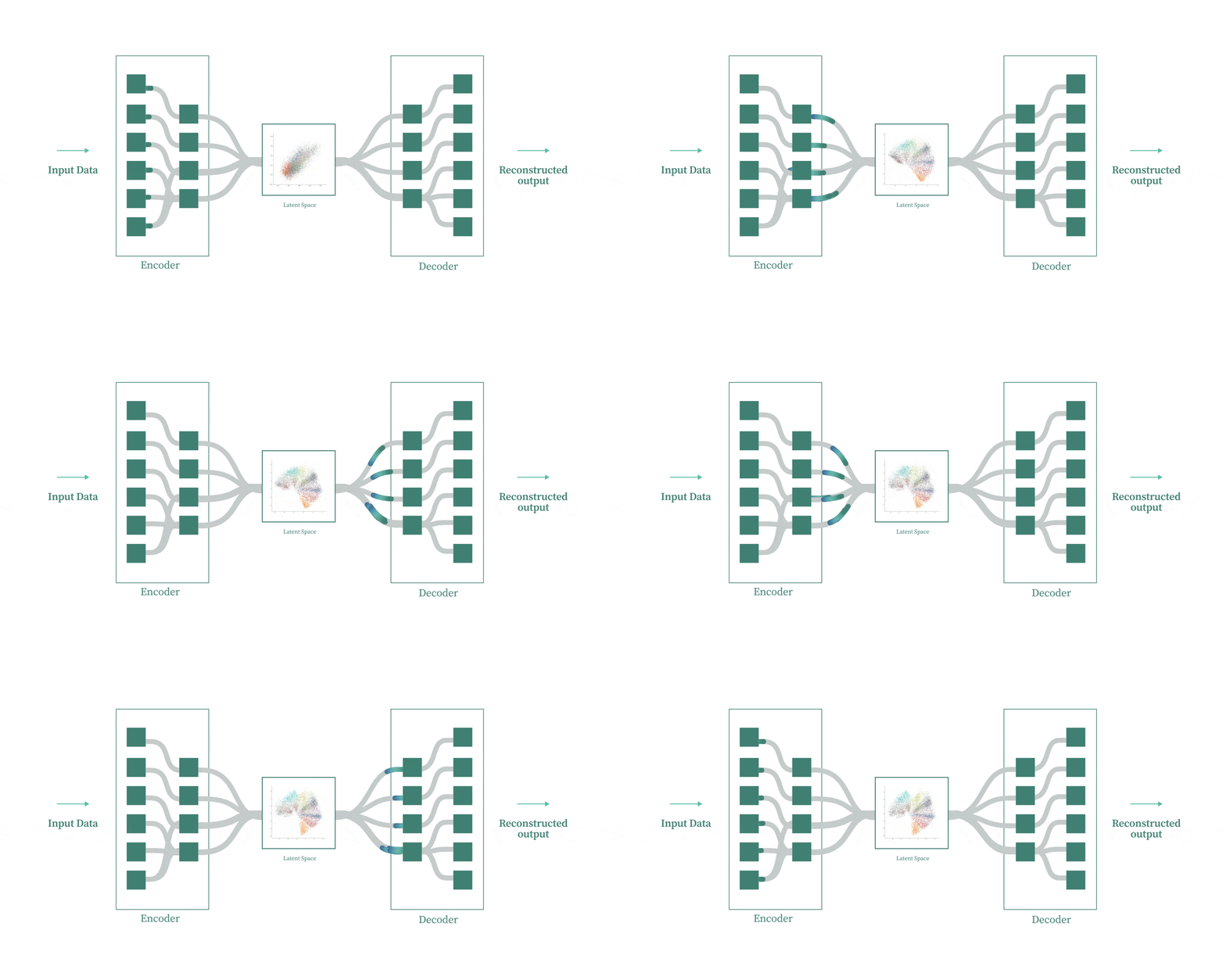
Figure 1.17 Variational Autoencoder architecture showing the encoder, continuous latent space, and decoder.
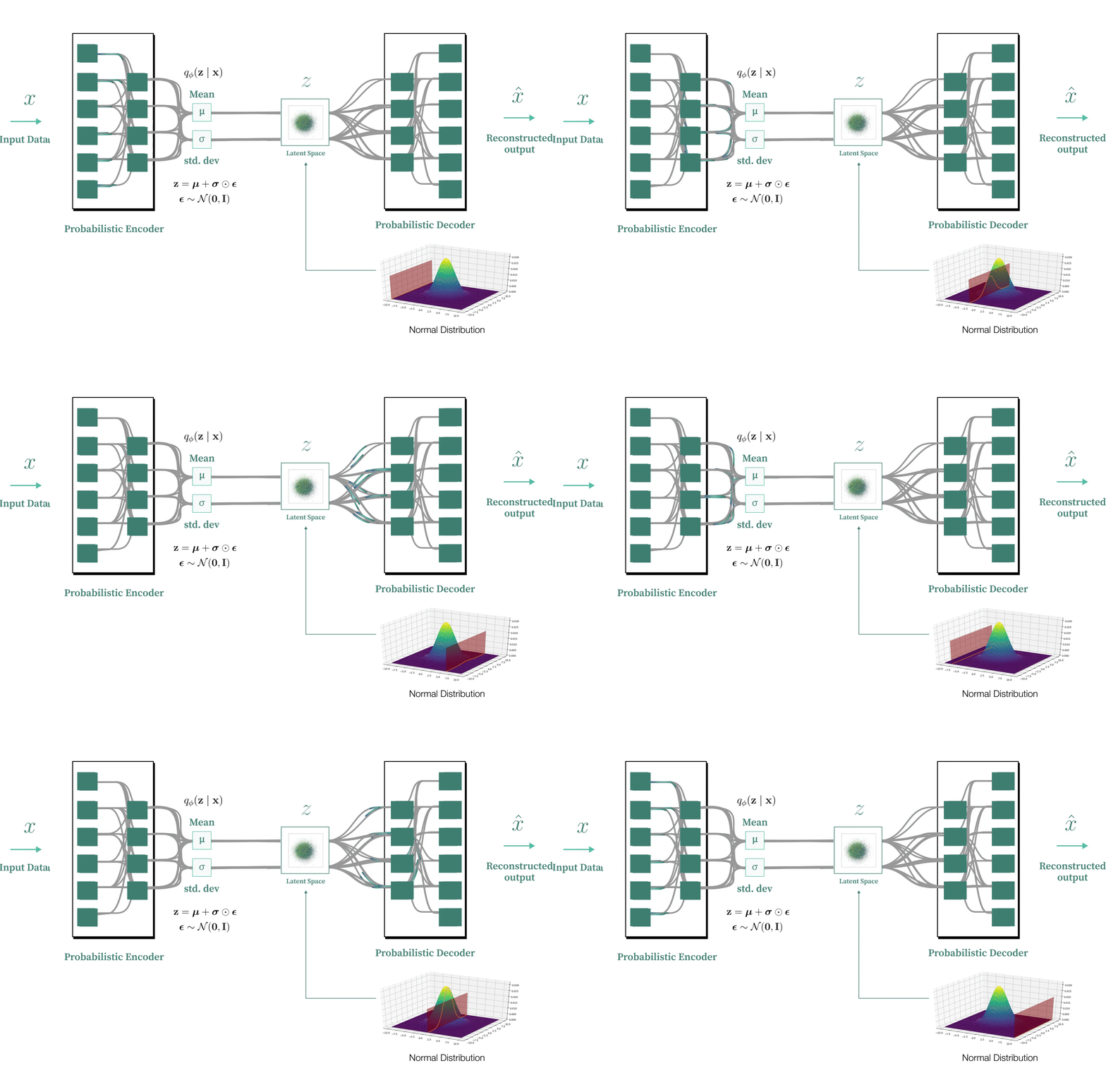
Figure 1.18 The VAE latent space regularized to follow a normal distribution.
Vector Quantization (VQ-VAE)
Vector quantization replaces the continuous latent space with a discrete codebook. For each input embedding, we find the nearest codebook entry (by Euclidean distance) and use that instead.
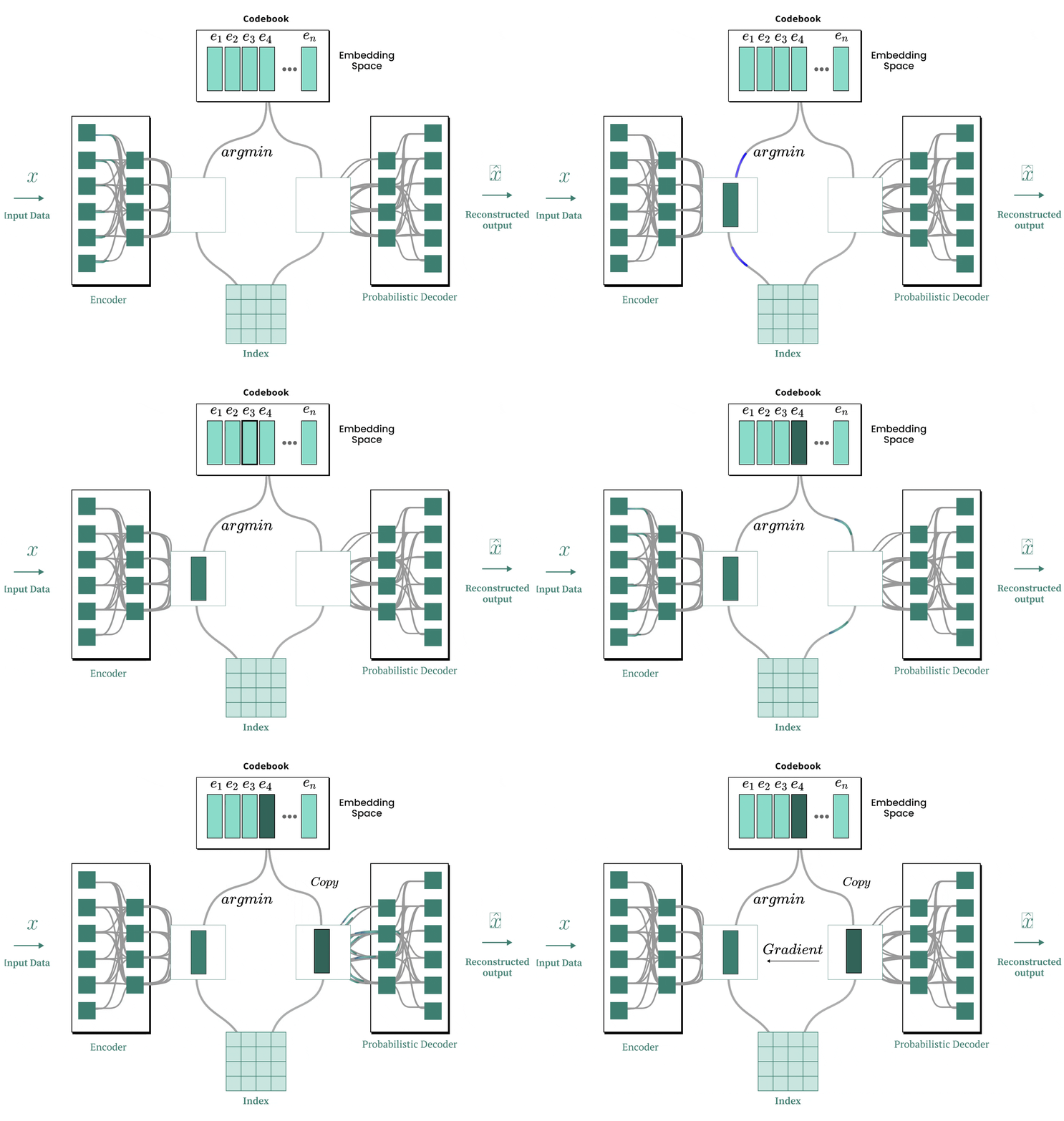
Figure 1.19 VQ-VAE architecture replacing the continuous latent space with discrete codebook lookup.
import torch
import torch.nn as nn
import torch.nn.functional as F

class VectorQuantizer(nn.Module):
    def __init__(self, num_embeddings, embedding_dim, commitment_cost=0.25):
        super().__init__()
        self.num_embeddings = num_embeddings
        self.embedding_dim = embedding_dim
        self.commitment_cost = commitment_cost

        # Codebook: a learnable lookup table of N vectors of dimension D
        self.embedding = nn.Embedding(num_embeddings, embedding_dim)
        nn.init.uniform_(self.embedding.weight, -0.1, 0.1)

    def forward(self, x):
        """
        x: (batch, seq_len, embedding_dim)
        """
        B, T, D = x.shape
        flat_x = x.reshape(B * T, D)                          # (B*T, D)

        # Euclidean distance between each input vector and all codebook entries
        distances = torch.cdist(flat_x, self.embedding.weight, p=2)  # (B*T, N)

        # Find nearest codebook entry
        encoding_indices = torch.argmin(distances, dim=1)      # (B*T,)

        # Look up the quantized vectors
        quantized = self.embedding(encoding_indices).view(B, T, D)

        # VQ-VAE Loss:
        # Codebook loss: move codebook entries closer to encoder output
        q_latent_loss = F.mse_loss(quantized, x.detach())
        # Commitment loss: move encoder output closer to codebook entries
        e_latent_loss = F.mse_loss(quantized.detach(), x)

        loss = q_latent_loss + self.commitment_cost * e_latent_loss

        # Straight-through estimator: pass gradients through the discrete step
        quantized = x + (quantized - x).detach()

        return quantized, loss
The argmin is non-differentiable, so gradients can't flow through it. The straight-through estimator trick x + (quantized - x).detach() makes the forward pass return quantized but the backward pass sees x directly. Gradients skip the quantization step and reach the Transformer and convolution layers.
The two loss terms pull from opposite directions: q_latent_loss moves codebook entries toward the encoder outputs, while e_latent_loss moves encoder outputs toward the codebook entries.
Residual Vector Quantization (RVQ)
The problem with vanilla VQ: snapping to a single codebook entry loses information. The gap between the original vector and its nearest code can be large.
RVQ fixes this with multiple codebooks in sequence. Quantize with the first codebook, compute the residual (the error), then quantize that residual with a second codebook. Repeat. Each codebook captures finer details that previous ones missed.
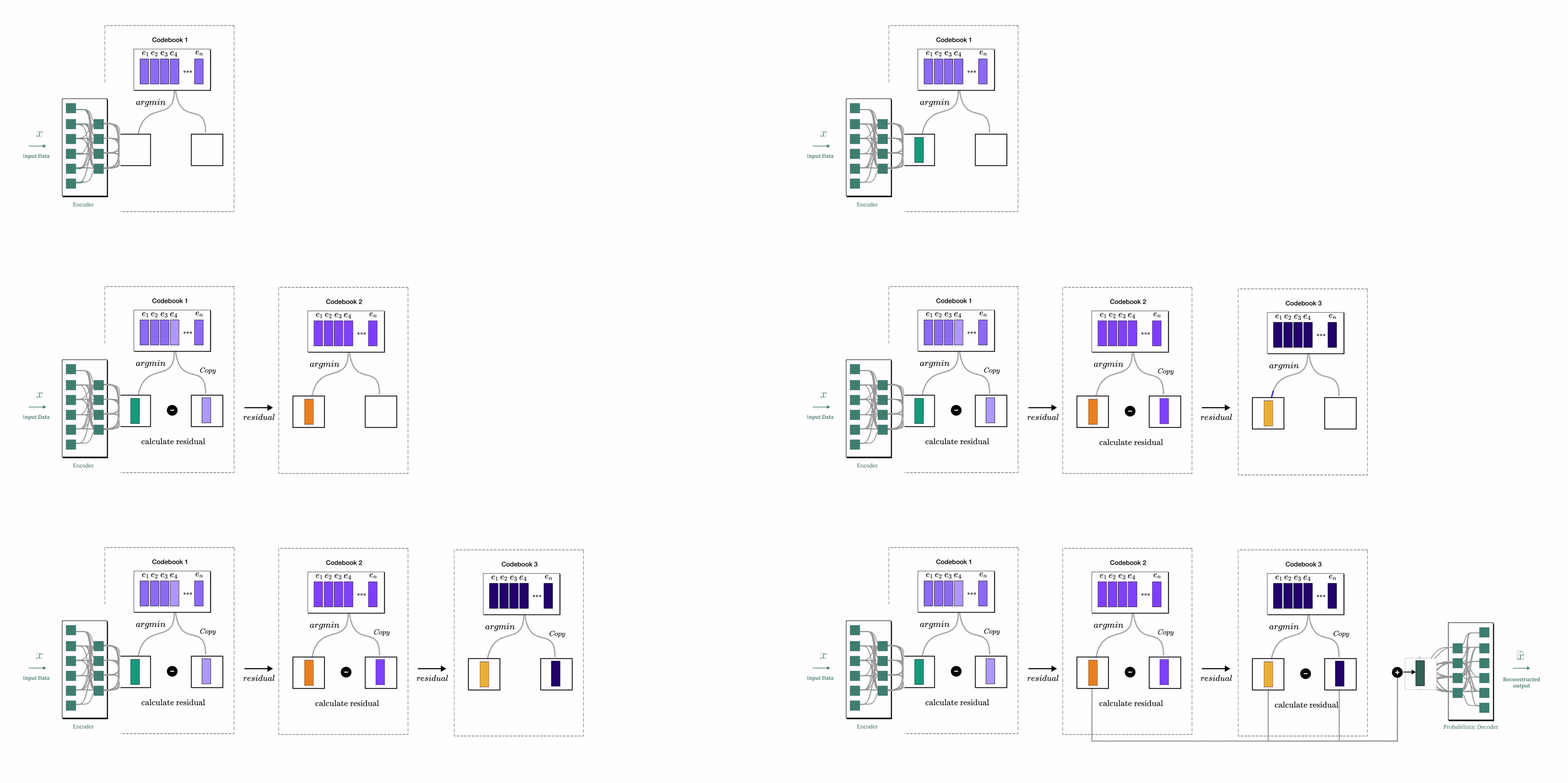
Figure 1.20 Residual Vector Quantization: each codebook quantizes the residual error of the previous one.
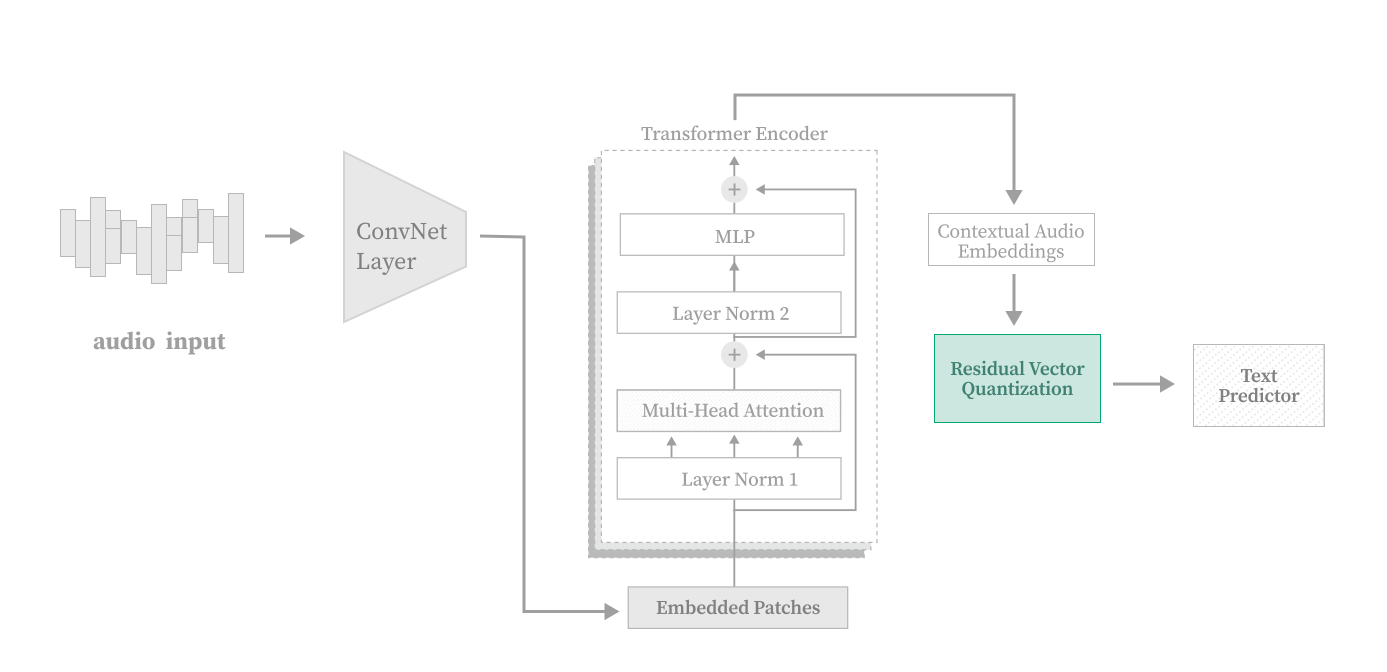
Figure 1.21 The Residual Vector Quantizer highlighted within the full model architecture.
import torch
import torch.nn as nn
from vector_quantizer import VectorQuantizer

class ResidualVectorQuantizer(nn.Module):
    def __init__(self, num_codebooks=4, codebook_size=1024,
                 embedding_dim=32, commitment_cost=0.25):
        super().__init__()
        self.codebooks = nn.ModuleList([
            VectorQuantizer(codebook_size, embedding_dim, commitment_cost)
            for _ in range(num_codebooks)
        ])

    def forward(self, x):
        residual = x
        out = torch.zeros_like(x)
        total_loss = 0.0

        for codebook in self.codebooks:
            quantized_diff, loss = codebook(residual)

            out = out + quantized_diff           # Accumulate reconstruction
            residual = residual - quantized_diff  # Compute new residual
            total_loss = total_loss + loss        # Sum losses

        return out, total_loss
With 4 codebooks of size 1024 each, the model has a rich discrete vocabulary to represent the audio features. The final output is the sum of all quantized residuals.
1.11 Assembling the Full Model
Now we wire everything into a single TranscribeModel:
import torch
import torch.nn as nn
from downsampling import DownsamplingNetwork
from transformer import TransformerEncoder
from rvq import ResidualVectorQuantizer

class TranscribeModel(nn.Module):
    def __init__(self, num_codebooks=4, codebook_size=1024,
                 embedding_dim=32, vocab_size=28, strides=(2,2,2,2),
                 num_transformer_layers=6, max_seq_length=10000, num_heads=4,
                 initial_mean_pooling_kernel_size=2):
        super().__init__()

        # 1) Convolutional front-end
        self.downsampling_network = DownsamplingNetwork(
            embedding_dim=embedding_dim,
            hidden_dim=embedding_dim // 2,
            in_channels=1,
            initial_mean_pooling_kernel_size=initial_mean_pooling_kernel_size,
            strides=strides,
        )

        # 2) Transformer encoder
        self.pre_rvq_transformer = TransformerEncoder(
            embed_size=embedding_dim,
            num_layers=num_transformer_layers,
            max_seq_length=max_seq_length,
            num_heads=num_heads,
        )

        # 3) Residual Vector Quantizer
        self.rvq = ResidualVectorQuantizer(
            num_codebooks=num_codebooks,
            codebook_size=codebook_size,
            embedding_dim=embedding_dim,
        )

        # 4) Output projection to vocabulary
        self.output_layer = nn.Linear(embedding_dim, vocab_size)

    def forward(self, x):
        """
        x: (batch, time) raw audio waveform
        """
        if x.dim() == 2:
            x = x.unsqueeze(1)            # (B, 1, T) for Conv1d

        x = self.downsampling_network(x)   # (B, T', D)
        x = self.pre_rvq_transformer(x)    # (B, T', D)
        x, vq_loss = self.rvq(x)           # (B, T', D)

        x = self.output_layer(x)           # (B, T', vocab_size)
        log_probs = torch.nn.functional.log_softmax(x, dim=-1)

        return log_probs, vq_loss

    def save(self, path):
        torch.save({"model": self.state_dict(), "options": self.options}, path)

    @staticmethod
    def load(path, map_location=None):
        checkpoint = torch.load(path, map_location=map_location)
        model = TranscribeModel(**checkpoint["options"])
        model.load_state_dict(checkpoint["model"])
        return model
The forward pass is straightforward: downsample, attend, quantize, project. The model outputs log-probabilities over the vocabulary at each time step, which is what CTC loss expects.
1.12 CTC Loss
In speech recognition, the input (audio frames) and output (characters) have wildly different lengths. A 7-second clip might produce thousands of output frames, but the text is only a few dozen characters. There's no obvious one-to-one mapping between them.
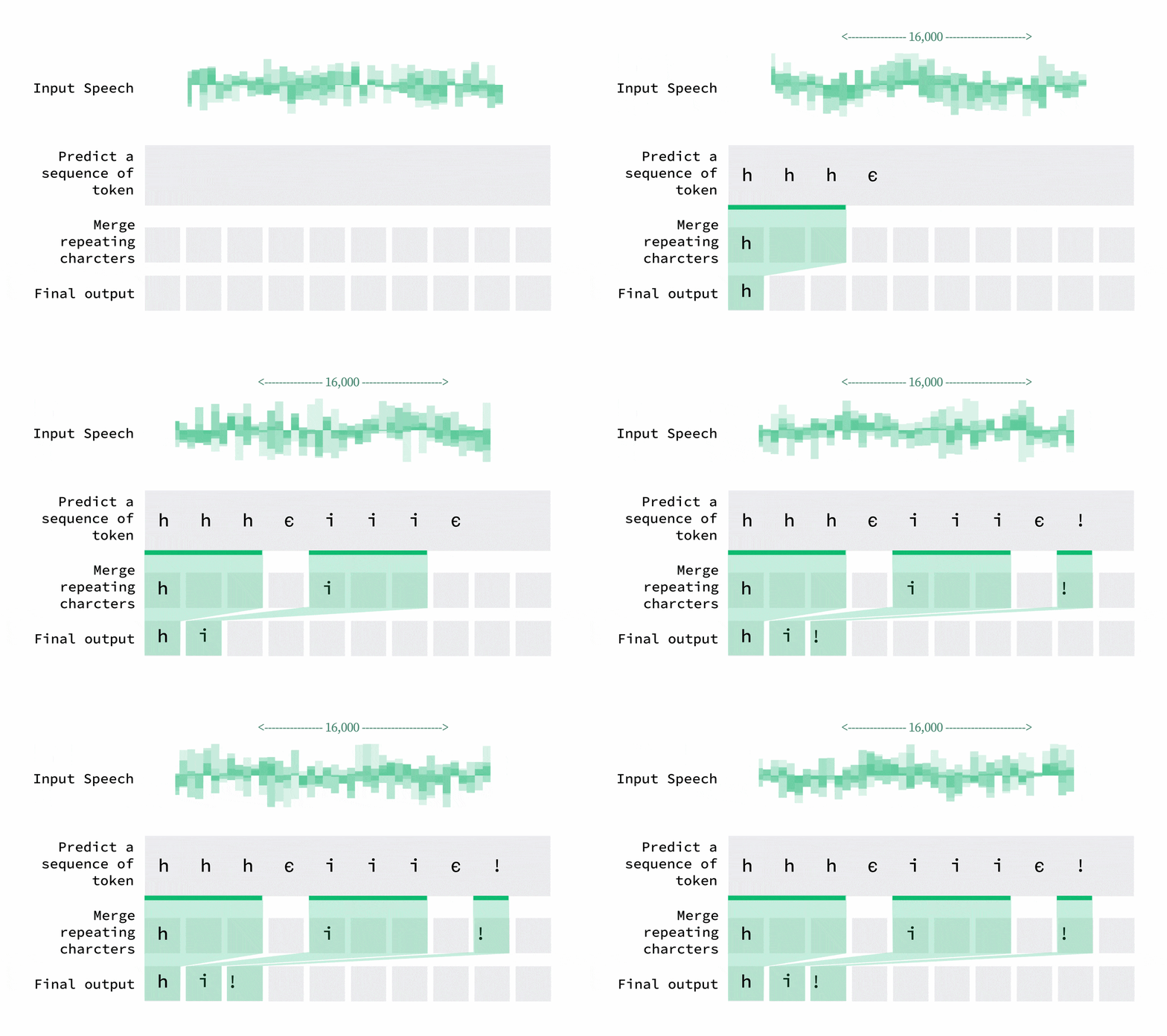
Figure 1.22 The length mismatch between audio frames and text characters.
CTC (Connectionist Temporal Classification) solves this. It introduces a special blank token and considers all possible ways the target text could align with the output sequence. During decoding, repeated characters collapse and blanks get removed.
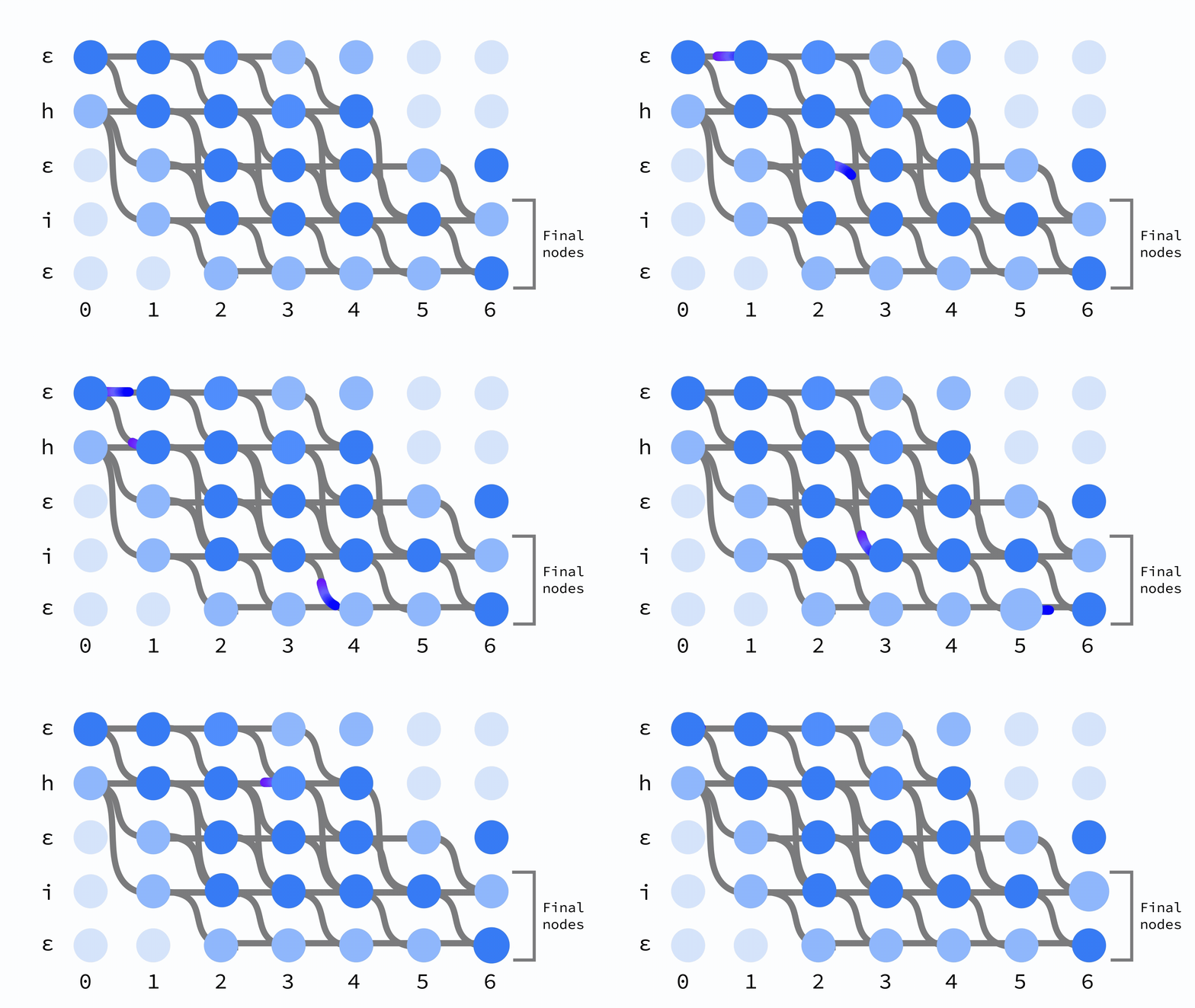
Figure 1.23 CTC dynamic programming graph showing all possible alignment paths.
For example, if the model outputs hh_eee_lll_ll_ooo (where _ is the blank token), CTC decoding produces hello: first collapse consecutive duplicates to get h_e_l_l_o, then remove blanks to get hello.
import torch
import torch.nn as nn

def run_loss_function(log_probs, target, blank_token):
    """
    Computes CTC Loss.

    Args:
        log_probs: (batch, T, vocab) log-probabilities from the model
        target:    (batch, U) ground truth token IDs
        blank_token: token ID used for CTC blank
    """
    loss_function = nn.CTCLoss(blank=blank_token, zero_infinity=True)

    # Input lengths: full sequence length for each batch item
    input_lengths = tuple(log_probs.shape[1] for _ in range(log_probs.shape[0]))

    # Target lengths: count non-blank tokens
    target_lengths = (target != blank_token).sum(dim=1)
    target_lengths = tuple(t.item() for t in target_lengths)

    # CTC expects (T, batch, vocab)
    input_seq_first = log_probs.permute(1, 0, 2)
    loss = loss_function(input_seq_first, target, input_lengths, target_lengths)
    return loss
For greedy decoding at inference time:
def decode_ctc_output(log_probs_batch, tokenizer, blank_token):
    """
    Greedy CTC decoding: argmax at each timestep, collapse repeats, remove blanks.
    """
    pred_ids = log_probs_batch.argmax(dim=-1)  # (B, T)
    decoded_texts = []

    for seq in pred_ids:
        prev = blank_token
        ids = []
        for t in seq.tolist():
            if t != blank_token and t != prev:
                ids.append(t)
            prev = t

        decoded_texts.append(tokenizer.decode(ids) if ids else "")

    return decoded_texts
If we had frame-level alignment (knowing exactly which frame maps to which character), we could just use cross-entropy. CTC removes that requirement, which is why it's the standard for encoder-only speech recognition.
1.13 The Overall Loss Function
The total training loss is CTC loss plus the VQ loss from the Residual Vector Quantizer:
is a hyperparameter that scales the VQ loss contribution. We use a warmup schedule for it: start high (10.0) to quickly stabilize the codebooks early in training, then linearly decay to 0.5 after 1,000 steps.
# VQ loss warmup schedule
vq_loss_weight = max(
    VQ_FINAL_LOSS_WEIGHT,                      # 0.5
    VQ_INITIAL_LOSS_WEIGHT                     # 10.0
    - (VQ_INITIAL_LOSS_WEIGHT - VQ_FINAL_LOSS_WEIGHT)
    * (steps / VQ_WARMUP_STEPS),               # linear decay over 1000 steps
)

total_loss = ctc_loss + vq_loss_weight * vq_loss
1.14 Data Loading and Collation
Audio clips in a batch have different lengths, so we need a custom collator that pads both audio and text sequences:
from torch.nn.utils.rnn import pad_sequence

class VoiceCollator:
    def __init__(self, tokenizer):
        self.tokenizer = tokenizer

    def __call__(self, batch):
        audio_list = [item['audio'] for item in batch]
        input_ids_list = [item['input_ids'] for item in batch]
        texts = [item['text'] for item in batch]

        # Pad audio sequences with zeros
        padded_audio = pad_sequence(audio_list, batch_first=True, padding_value=0.0)

        # Pad token sequences with the blank/pad token ID
        pad_id = self.tokenizer.token_to_id("▁") or 0
        padded_input_ids = pad_sequence(
            input_ids_list, batch_first=True, padding_value=pad_id
        )

        return {
            "audio": padded_audio,
            "input_ids": padded_input_ids,
            "text": texts,
            "audio_lengths": torch.tensor([len(x) for x in audio_list]),
            "target_lengths": torch.tensor([len(x) for x in input_ids_list]),
        }
The dataset class loads audio from Hugging Face, resamples to 16kHz, uppercases the text, and tokenizes:
class HuggingFaceSpeechDataset(Dataset):
    def __init__(self, dataset_name, tokenizer, sample_rate=16000, split="train",
                 max_examples=None, max_text_length=None):
        dataset = load_dataset(dataset_name)

        # Handle DatasetDict vs Dataset
        if hasattr(dataset, 'keys'):
            self.dataset = dataset.get(split, dataset[list(dataset.keys())[0]])
        else:
            self.dataset = dataset

        # Optional filtering for debug/overfit mode
        if max_text_length or max_examples:
            # Filter by text length and limit number of examples
            # ... (filtering logic)
            pass

        self.dataset = self.dataset.cast_column("audio", Audio(decode=True))
        self.tokenizer = tokenizer
        self.sample_rate = sample_rate

    def __getitem__(self, idx):
        item = self.dataset[idx]

        # Extract and process audio
        waveform = torch.tensor(item["audio"]["array"], dtype=torch.float32)
        if waveform.dim() > 1:
            waveform = waveform.mean(dim=0)  # Convert stereo to mono

        # Resample if needed
        sr = item["audio"]["sampling_rate"]
        if sr != self.sample_rate:
            waveform = torchaudio.transforms.Resample(sr, self.sample_rate)(
                waveform.unsqueeze(0)
            ).squeeze(0)

        # Tokenize text
        text = item.get("text", item.get("transcription", "")).upper()
        input_ids = torch.tensor(self.tokenizer.encode(text).ids, dtype=torch.long)

        return {"audio": waveform, "input_ids": input_ids, "text": text}
1.15 The Training Loop
With all the pieces built, here's the training loop:
import torch
from torch.utils.tensorboard import SummaryWriter
from transcribe import TranscribeModel
from tokenizer import get_tokenizer
from ctc_utils import run_loss_function, decode_ctc_output
from dataset import get_dataloaders

def train_model():
    writer = SummaryWriter("runs/experiment")

    # Setup tokenizer and blank token
    tokenizer = get_tokenizer()
    blank_token = tokenizer.token_to_id("▁") or 0

    device = torch.device("cuda" if torch.cuda.is_available() else "cpu")

    # Create model
    model = TranscribeModel(
        vocab_size=tokenizer.get_vocab_size(),
        embedding_dim=32,
        num_transformer_layers=6,
        num_heads=4,
        strides=(2, 2, 2, 2),
    ).to(device)

    print(f"Trainable parameters: {sum(p.numel() for p in model.parameters() if p.requires_grad)}")

    optimizer = torch.optim.Adam(model.parameters(), lr=0.0005)

    train_loader, val_loader = get_dataloaders(batch_size=32)

    steps = 0
    for epoch in range(1000):
        model.train()
        for batch in train_loader:
            audio = batch["audio"].to(device)
            target = batch["input_ids"].to(device)

            optimizer.zero_grad()
            output, vq_loss = model(audio)

            # CTC loss
            ctc_loss = run_loss_function(output, target, blank_token)

            # VQ warmup schedule
            vq_weight = max(0.5, 10.0 - 9.5 * (steps / 1000))
            loss = ctc_loss + vq_weight * vq_loss

            if torch.isinf(loss) or torch.isnan(loss):
                continue

            loss.backward()
            torch.nn.utils.clip_grad_norm_(model.parameters(), max_norm=10.0)
            optimizer.step()
            steps += 1

            if steps % 20 == 0:
                print(f"Epoch {epoch+1}, Step {steps}, "
                      f"CTC: {ctc_loss.item():.3f}, VQ: {vq_loss.item():.3f}")

        # Evaluate at end of each epoch
        evaluate(model, val_loader, tokenizer, blank_token, device, epoch)
A few things worth noting: we use Adam with lr=5e-4 and clip gradients at max norm 10.0 to keep things stable. The VQ weight warmup (10.0 down to 0.5 over 1,000 steps) gives the codebooks time to settle before CTC takes over. We log everything to TensorBoard and checkpoint after each epoch.
1.16 Training and Results
We used RunPod to grab an A100 GPU for training.
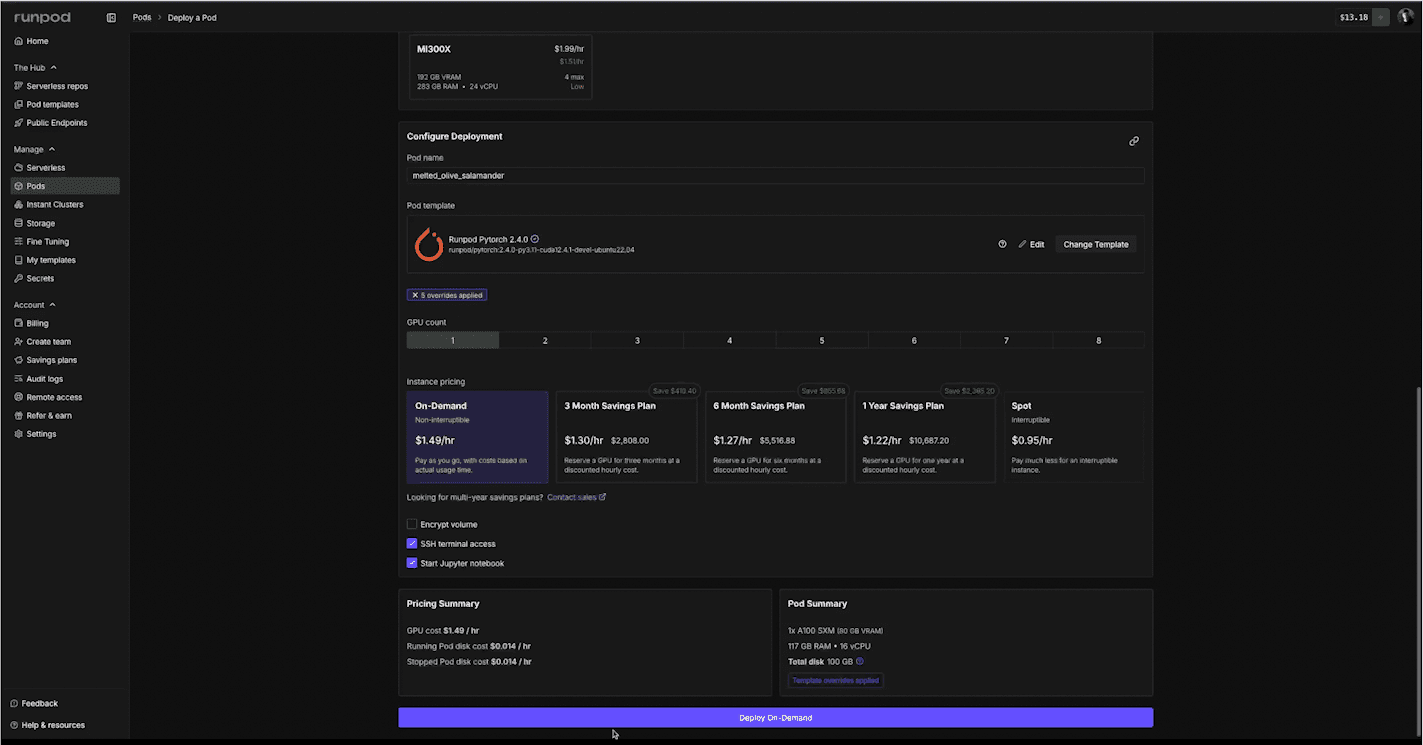
Figure 1.25 Launching an A100 GPU instance on RunPod for model training.
We connected via SSH from VS Code:
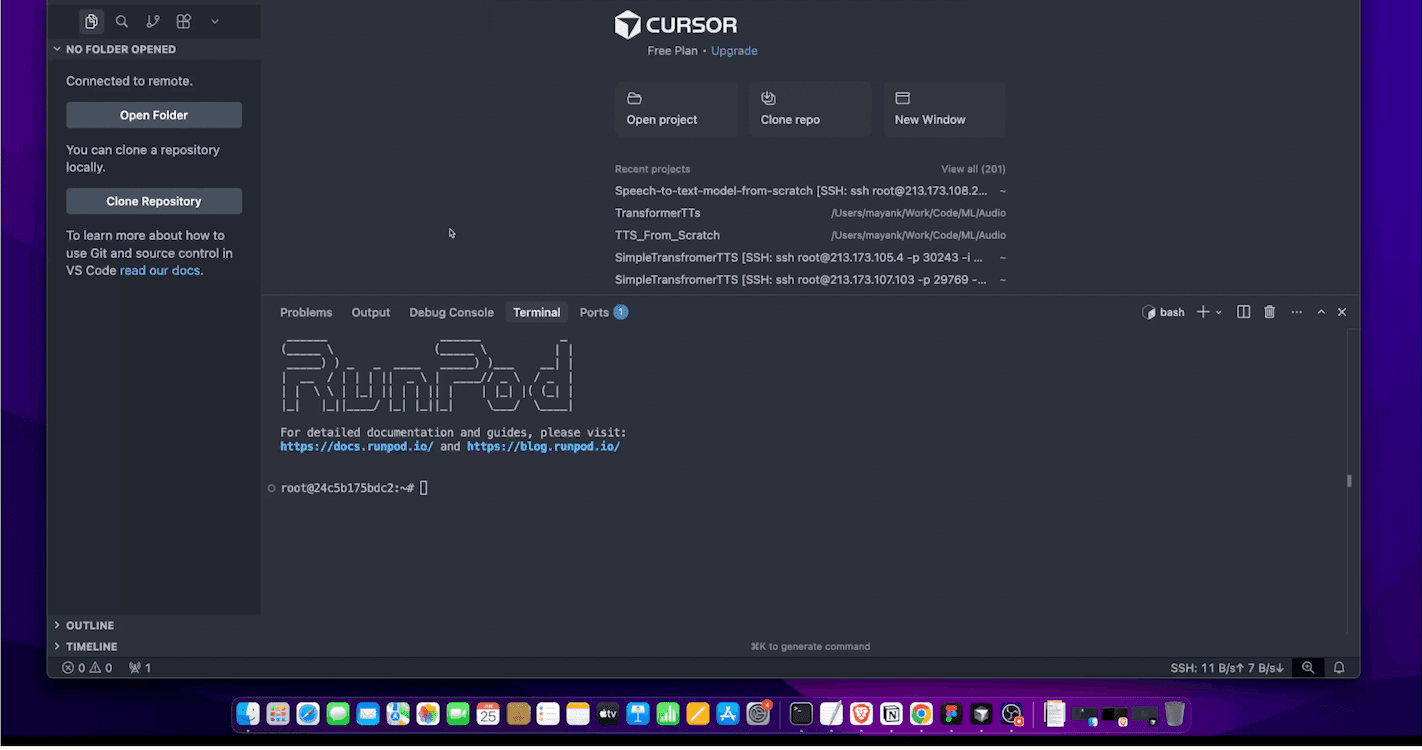
Figure 1.26 VS Code connected to the RunPod instance via SSH for remote development.
Then cloned the repo, downloaded LJ Speech (3.5 GB), set up a venv, and installed dependencies:
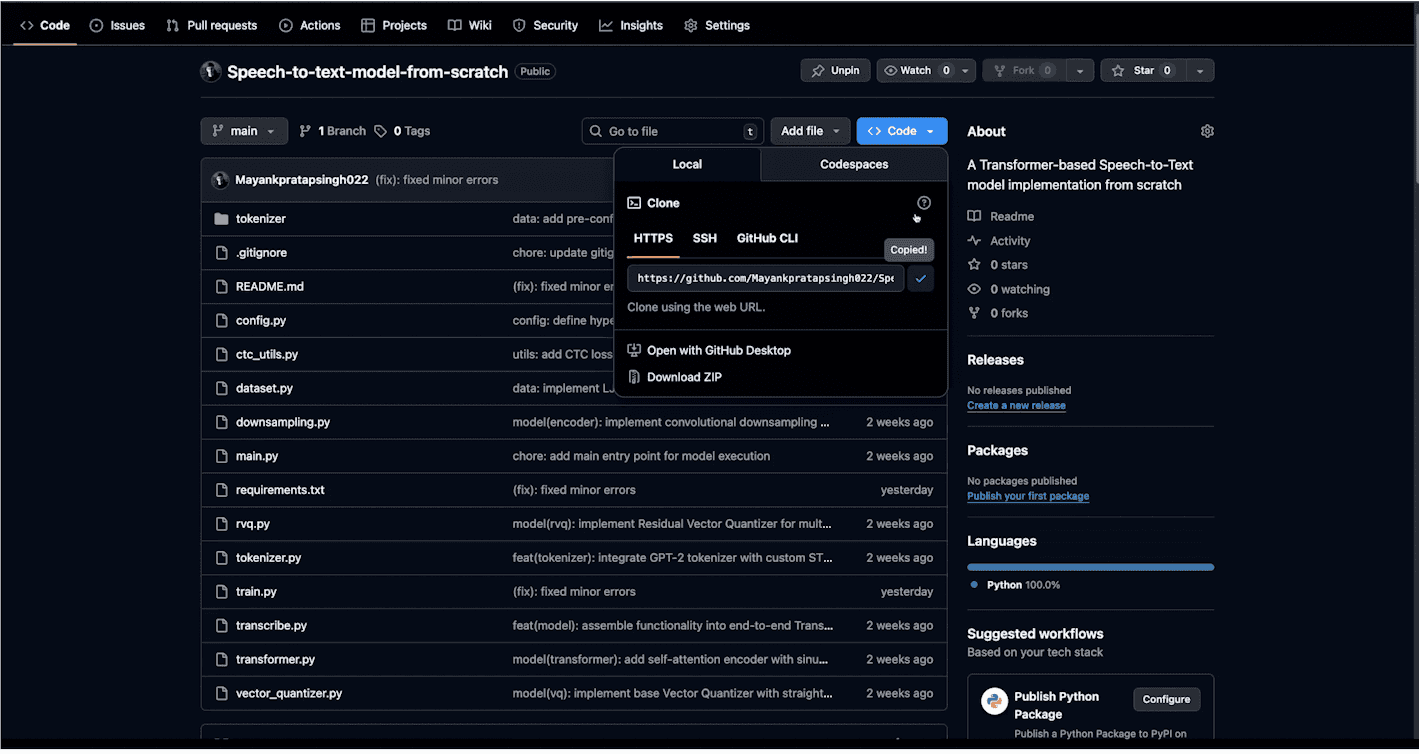
Figure 1.27 Cloning the project repository on the remote GPU instance.

Figure 1.28 Downloading the LJ Speech dataset (3.5 GB) to the training server.
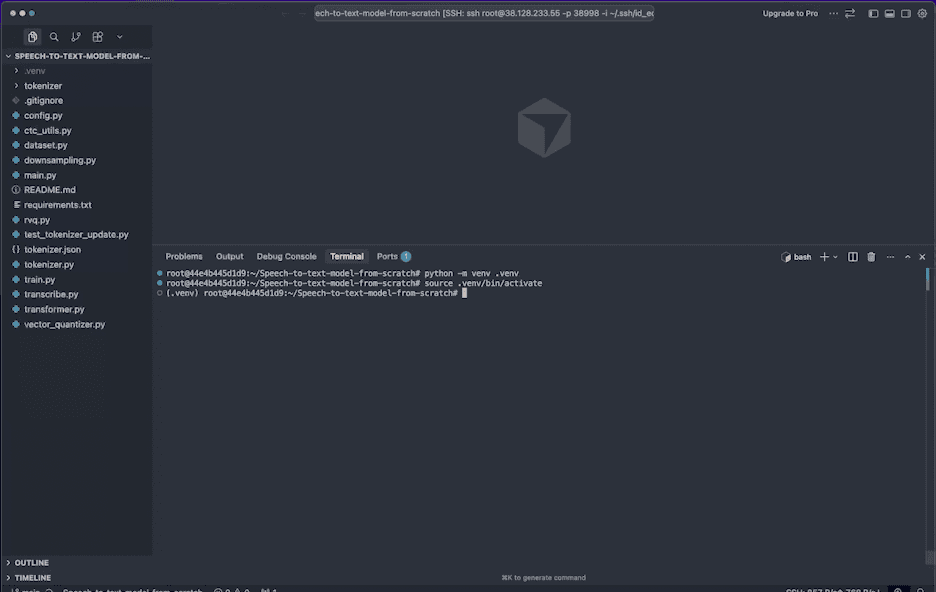
Figure 1.29 Creating a Python virtual environment and installing project dependencies.
After 3 hours on the full LJ Speech dataset (13,100 clips), the model produced garbage. A basic Transformer STT trained from scratch on this much data needs way more compute, probably days of A100 time.
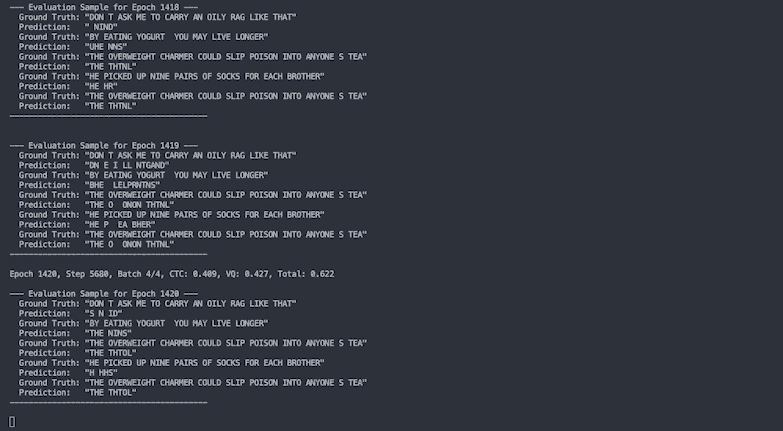
Figure 1.30 Model output after 3 hours of training on the full dataset, producing no meaningful transcriptions.
So we cut the dataset down to just 200 clips. This let the model overfit on a small set and start producing recognizable outputs after about 2 hours.
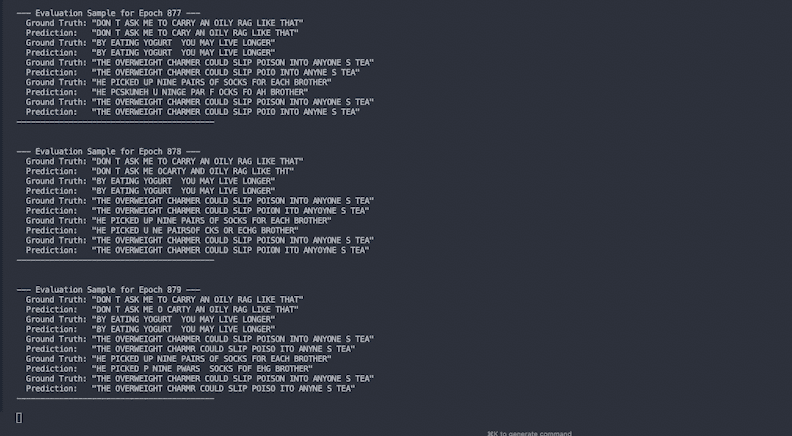
Figure 1.31 Successful transcription results after training on a reduced dataset of 200 clips, where the model begins producing recognizable text.
To be clear: this model is overfitted on those 200 clips. It can transcribe them because it's memorized them. A production STT system needs far more data, compute, and probably a more modern architecture. But the point here is understanding how the pieces work, not building the next Whisper.
1.17 Configuration and Getting Started
Here's the config we used:
# Audio
SAMPLE_RATE = 16000
N_MELS = 80

# Training
BATCH_SIZE = 32
NUM_EPOCHS = 1000
LEARNING_RATE = 0.0005
TRAIN_SPLIT = 0.9

# Model Architecture
INPUT_CHANNELS = 1
HIDDEN_DIM = 16
EMBEDDING_DIM = 32
STRIDES = (2, 2, 2, 2)
KERNEL_SIZE = 8

# Transformer
NUM_HEADS = 4
NUM_LAYERS = 6
MAX_SEQ_LENGTH = 10000
FF_HIDDEN_MULT = 4
DROPOUT = 0.1

# Vector Quantization
CODEBOOK_SIZE = 1024
NUM_CODEBOOKS = 4
COMMITMENT_COST = 0.25

# VQ Loss Schedule
VQ_INITIAL_LOSS_WEIGHT = 10.0
VQ_WARMUP_STEPS = 1000
VQ_FINAL_LOSS_WEIGHT = 0.5
Project structure:
Speech-to-text-model-from-scratch/
├── main.py                # Entry point
├── config.py              # All hyperparameters and paths
├── train.py               # Training loop and evaluation
├── transcribe.py          # Main model (assembles all components)
├── downsampling.py        # Convolutional downsampling network
├── transformer.py         # Transformer encoder with positional encoding
├── vector_quantizer.py    # Vector Quantizer module
├── rvq.py                 # Residual Vector Quantizer
├── dataset.py             # Dataset loading and collation
├── tokenizer.py           # Character tokenizer setup
├── ctc_utils.py           # CTC loss and greedy decoding
├── requirements.txt       # Dependencies
└── tokenizer/             # Pre-trained BPE tokenizer files (legacy)
To get started:
git clone https://github.com/edit-this-link-to-your-repo
cd Speech-to-text-model-from-scratch
pip install -r requirements.txt
Dependencies:
torch
torchaudio
transformers
pandas
tensorboard
tokenizers
datasets
soundfile
Edit config.py to tweak hyperparameters. For a quick sanity check, enable overfit mode:
OVERFIT_MODE = True
OVERFIT_NUM_EXAMPLES = 10
Then run training and watch it in TensorBoard:
python main.py
tensorboard --logdir runs/
The training loop prints evaluation samples at the end of each epoch (ground truth vs. predicted transcriptions) so you can see how it's doing.
1.18 Key Takeaways
Audio is just numbers, a 1D array of floats sampled at 16kHz. Once you internalize that, the rest of the pipeline makes more sense.
Raw audio sequences are way too long for Transformer attention. Strided convolutions give us a 32x reduction while also learning useful features from the waveform.
CTC is what makes encoder-only STT work. Instead of needing frame-level labels (which would be incredibly tedious to create), it considers all possible alignments and trains the model to maximize the probability of the correct transcript.
RVQ is a neat trick: instead of losing information by snapping to one codebook entry, you quantize the residual error with additional codebooks. Each one captures finer details the previous ones missed.
Training STT from scratch is hard. Even with an A100, our basic Transformer needed hours just to overfit on 200 clips. There's a reason Whisper and wav2vec use pre-training and encoder-decoder designs.
Further Reading
- Attention Is All You Need -- The original Transformer paper
- Connectionist Temporal Classification -- CTC loss paper by Alex Graves
- Neural Discrete Representation Learning -- The VQ-VAE paper
- SoundStream: An End-to-End Neural Audio Codec -- Introduces RVQ for audio
- LJ Speech Dataset -- The dataset used in this project
- wav2vec 2.0 -- Self-supervised speech representation learning
- Whisper -- OpenAI's encoder-decoder STT model
- DeepSpeech 2 -- End-to-end speech recognition with CTC
Code is on GitHub
Newsletter
Stay in the loop
Get notified when new chapters drop. No spam, unsubscribe anytime.